Skip to the page
For self-employed trades in the UK and IrelandFor self-employed electricians in the UK and IrelandFor self-employed plumbers in the UK and IrelandFor self-employed builders in the UK and IrelandFor self-employed decorators in the UK and IrelandFor self-employed landscapers in the UK and IrelandFor self-employed handymen in the UK and IrelandFor self-employed cleaners in the UK and Ireland

You did the job.Get paid for it.

Send the quote. Win the job. Get paid. Jack keeps on top of the chasing.

  • Quotes and invoices from your phone, in about a minute.
  • Jack keeps track of who needs a follow-up, and writes it in your words.
  • Follow-ups stop when the quote is answered or the invoice is marked paid.

The demo opens straight away. No sign-up, no card.

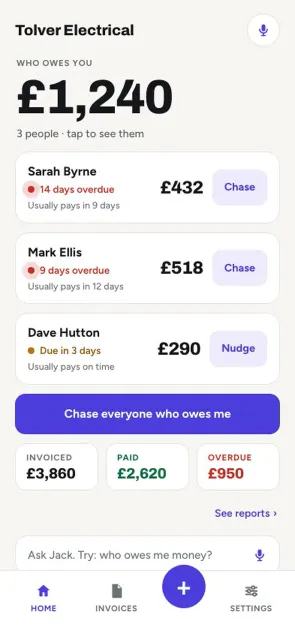
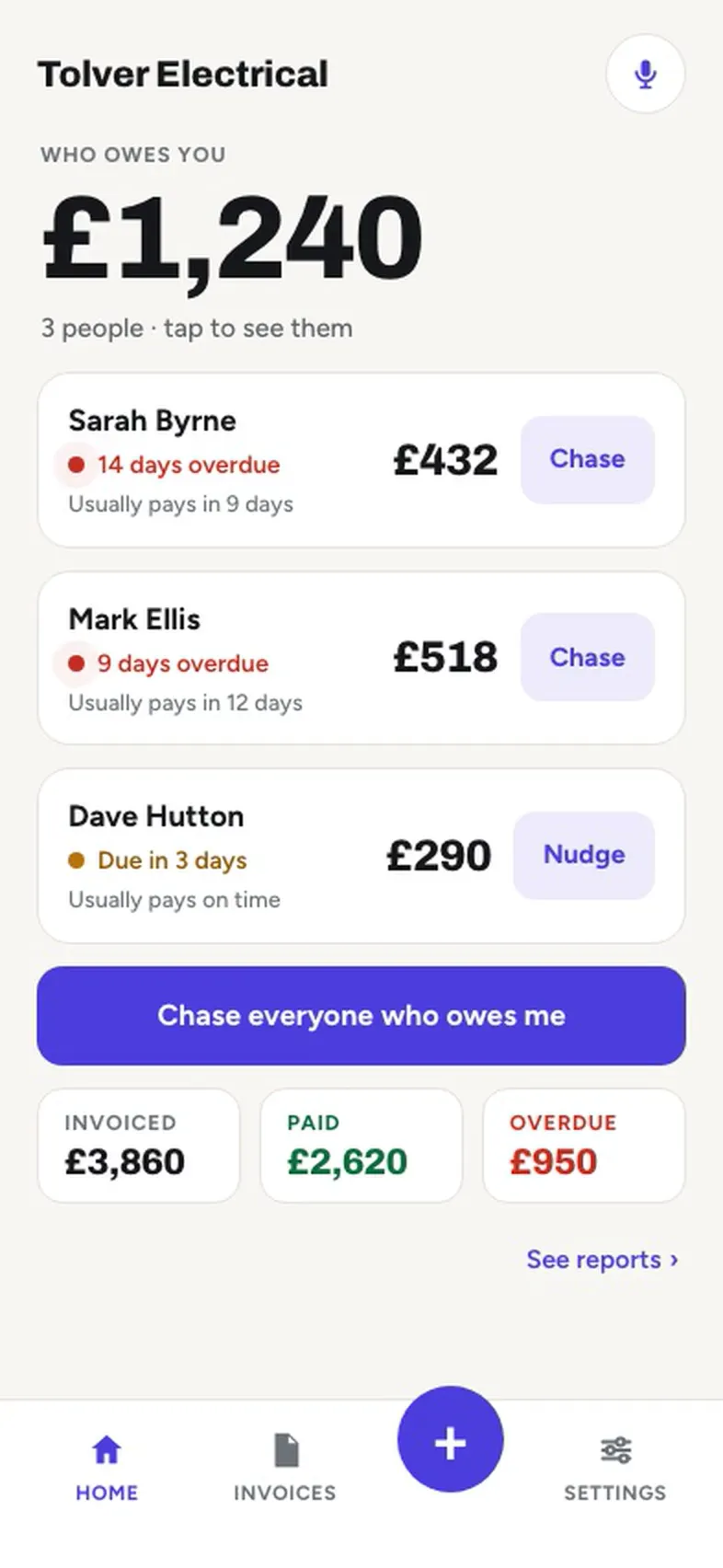
The app on a phone. Home says who owes you, with a Chase button beside each name. One tap sends the reminder, and the invoice turns to Paid.

Sent on your tapReminder 2 · by emailReminder 2 · by emailReminder 2 · by emailReminder 2 · by emailReminder 2 · by emailReminder 2 · by emailReminder 2 · by emailReminder 2 · by email

Money inPaid £432 · Sarah ByrnePaid £432 · Sarah ByrnePaid £432 · Sarah ByrnePaid £432 · Sarah ByrnePaid £432 · Sarah ByrnePaid £432 · Sarah ByrnePaid £432 · Sarah ByrnePaid £432 · Sarah Byrne

How it works

From quote to paid, in five steps.

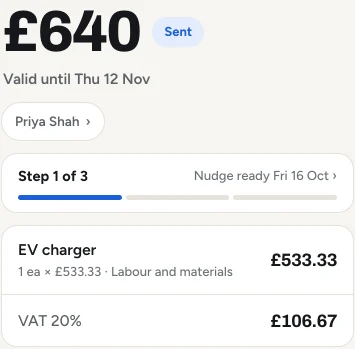
  1. A quote in the app, marked Sent: the amount, the valid-until date, the follow-up strip with the next nudge ready, and the EV charger it is for.

    Send the quote

    Price it on site and send it from your phone, by WhatsApp, text or email.

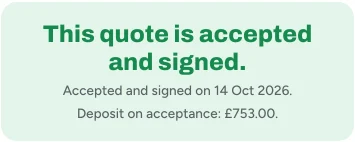
  2. A quote the client has signed: accepted and signed on 14 Oct 2026, and the deposit on acceptance.

    Win the job

    No answer? Jack has a nudge ready on day 3 and day 7. They accept and sign on their phone.

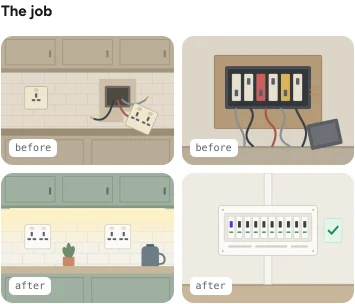
  3. The page a client pays from, showing the job's photos, each marked before or after.

    Do the work

    Get on with the job. Before and after photos go on the page they pay from.

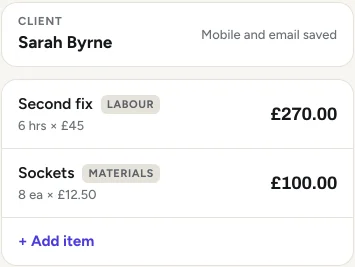
  4. An invoice being written in the app: the client's name, two lines of work with their prices, and Add item.

    Send the invoice

    One tap turns the accepted quote into an invoice, every line carried over. Check it and send it.

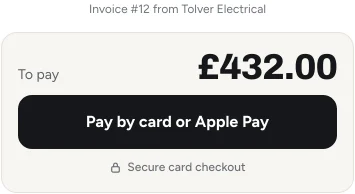
  5. On the page your client pays from: Bank transfer, with the business name, sort code and account number, the reference to use, and Copy details.

    Get paid

    They pay by bank transfer from the link. Record the payment and the reminders stop.

Get early access

Every screen on this page is the real app, on a sample electrician's account. Yours shows your own trade and jobs.

Follow-ups

Jack keeps on top of the chasing.

Automatic
Email follow-ups: Jack sends them on the day, once you switch that on.
One tap
WhatsApp or text: your phone opens with the words ready. You press send.
Stops
When the quote is accepted or declined, or the payment is recorded.
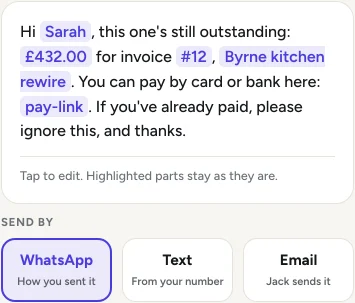
A reminder for an overdue invoice, written out with the client's name, the amount and the pay-link, and three ways to send it: WhatsApp, Text or Email.

Unpaid invoices

A heads-up the day before it's due, then reminders at 7, 14 and 21 days, each written out with their name, the amount and the pay-link.

  • Quiet hours, so nothing lands at midnight
  • Every one says: if you've already paid, ignore this

Record the payment and they stop.
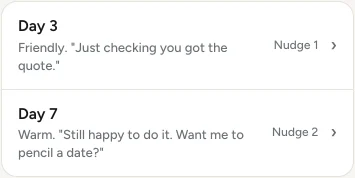
The two quote nudges in Settings, Messages: Day 3, friendly, just checking you got the quote, and Day 7, warm, still happy to do it, want me to pencil a date.

Open quotes

A nudge on day 3 and another on day 7 while a quote has no answer. Both in your words, both changed in Settings.

They stop when the quote is accepted or declined.

Features

The paperwork, done in a tap.

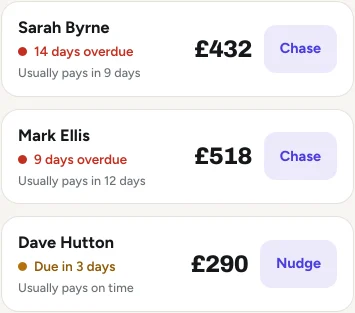
  • Home in the app: three clients who owe money, how overdue each is, how long each usually takes to pay, and a Chase or Nudge button beside each.

    Who owes you, at a glance

    Home shows who owes what, how late it is, and how long each one usually takes to pay.

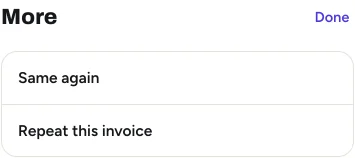
  • The More sheet on a paid invoice in the app, with Same again at the top and Repeat this invoice under it.

    Same again

    Copy a past invoice or quote in one tap. Dated today, due by their usual terms.

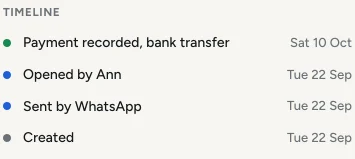
  • An invoice's timeline in the app: created, sent by WhatsApp, opened by the client, and paid by bank transfer.

    See when they open it

    The invoice tells you when they've opened it. A link preview doesn't count.

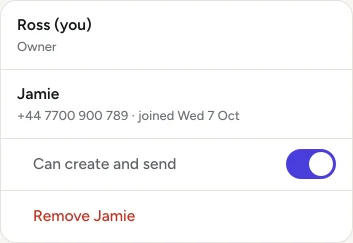
  • Your team in the app: the owner, one lad with their number, and a switch for whether that lad can create and send.

    Your lads and your accountant

    Up to 3 lads and your accountant included. Your lads never see your totals.

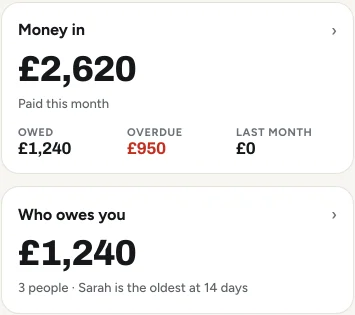
  • Reports in the app: money in this month with what is owed and overdue, and who owes you with the oldest.

    Four reports, no charts

    Money in, who owes you, jobs and tax. A number each, and the list behind it.

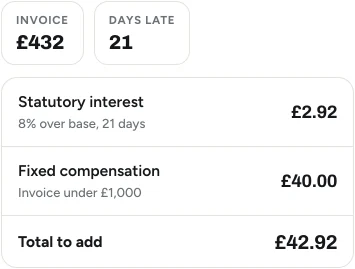
  • The late fee in the app for an invoice 21 days late: statutory interest, fixed compensation and the total to add.

    Late fee, worked out to the law

    For a business customer, the legal interest and compensation, added up. Off unless you turn it on.

See it for yourself

Watch an invoice go from start to paid.

Recorded on the app as it is, on our sample electrician's account. Nothing is sped up and nothing is cut.

  1. Pick the client and add the work
  2. Send it by email
  3. They pay by bank transfer
  4. Record it: Paid

Muted. Recorded on sample data.

Or try it yourself.

The guided demo takes you from quote to paid on a sample business, in eight short steps. No sign-up. Nothing is saved or sent.

Start the guided demo
The first frame of the recording: Home in the app, with who owes you and the plus button.

No catches

The small print, in big print.

What you can count on, said plainly.

  • Nothing goes without you

    No message reaches a client unless you tap send, or switch on automatic follow-ups yourself.

  • From your own phone

    WhatsApp and text open on your phone with the words ready, so they come from you.

  • We take no cut of your money

    They pay straight into your own account. We never hold it.

  • iPhone, Android or laptop

    It runs in the browser. Nothing to install, the same account on each.

Free

The Chase Pack

The electrician edition. The words work in any trade.The exact messages that get sparkies paid. Copy. Paste. Send.The electrician edition. The words work in any trade.The electrician edition. The words work in any trade.The electrician edition. The words work in any trade.The electrician edition. The words work in any trade.The electrician edition. The words work in any trade.The electrician edition. The words work in any trade.

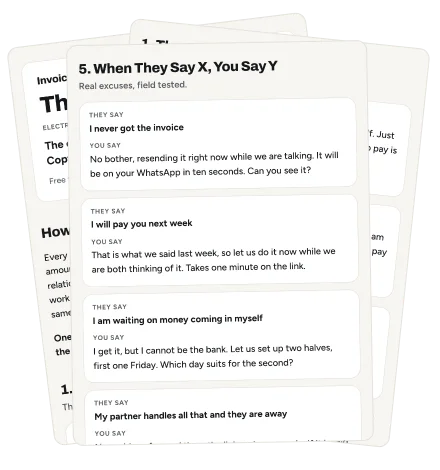
Word for word: the three chase texts, the deposit script, the quote follow-ups, the phone script, and what to say to every excuse. Plus the UK late payment law most trades never use.

Free. Nothing is emailed.

The pack opens straight away, in your browser. By sending this you agree we can email you about Invoice Jack. Never sold.

Three pages of the Chase Pack, one on another: the cover, the chase ladder, and what to say to every excuse.

Pricing

One price. Everything in it.

How you pay

£14.99 a monthEverything included. No tiers.

£99 a yearWorks out at £8.25 a month. Save £80.

  • Unlimited quotes and invoices
  • Jack follows up on quotes and unpaid invoices
  • Follow-ups stop once it's paid or answered
  • A pay page with your bank details on every invoice
  • Up to 3 lads, included
  • Your accountant, included
Get early access

Early access: one email the day sign-up opens. At launch: a free trial that needs a card. Cancel before the first payment and pay nothing.

Built for self-employed trades and crews of up to four, in the UK and Ireland.

Questions

Straight answers.

Can I try it before I sign up?

Yes. The guided demo opens straight away on a sample business and takes you from quote to paid: no sign-up, no card, no code.

Nothing you do there is saved or sent.

Is it just for electricians?

No. It's for self-employed trades and small crews: plumbers, heating engineers, builders, carpenters, roofers, decorators, gardeners, cleaners and more.

The demo's sample business happens to be an electrician's.

Do I need a card for the trial?

Yes. The free trial opens at launch and needs a card to start.

You see the price and the date of the first charge before you start, and nothing is taken before that date.

What does it cost after the trial?

£14.99 a month, or £99 a year. One plan, everything in it.

We remind you 3 days before the first charge, so it is never a surprise.

Can I cancel any time?

Yes, from Your plan in Settings. Nothing more is taken once you cancel.

It keeps working to the end of the time you have paid for.

Can my customers pay by card?

Today they pay by bank transfer: your bank details are on every invoice and on the page they pay from.

Card payments are built and are being tested before launch.

Do you take a cut of my money?

No. The money goes straight to your own account. We never hold it.

The card processor charges its usual card fee. We add nothing on top.

Can my accountant see it?

Yes. Send them a read-only link from Settings and they can see and download your invoices, payments and receipts.

They can't change anything, and you can take the link away whenever you like.

Can I take my data with me?

Yes. Export everything from Settings whenever you like.

You can delete your account there too.

Stop chasing. Start getting paid.

The demo opens straight away. No sign-up, no card.